Mr. J.V. Presogna
Presogna Productions

Art | Freeware | go2jvp Main | Music | Science | Sports | Writing

Corporate Messages
Romantic Messages
All in Secret Code
www.go2jvp.com/ Personalized Code
for Classified Items
Secure Messages

JVP-Encrypt
(Includes JVP-Time as a Bonus)

JVP-Encrypt

Multitrack Encryption and Decryption Software
with Base Codes included.
(Single User License Only)

Use JVP-Encrypt to send virtually unbreakable coded messages.
"In-House Communications, Family, School, Lovers, Corporations, even Athletics."


How to Order | Preview | Features | Examples | Puzzle | License | J.F. Byrne

How to Send and Receive Coded Messages by E-Mail

JVP-Encrypt Released February 25, 2010

by

Mr. J.V. Presogna
Presogna Productions

Download File Size = 3.03 MB Zip File
Program Size (JVP-Encrypt) = 9.07 MB on your hard drive
Program Size (JVP-Time) = 2.07 MB on your hard drive
Price: $ 49.00

How to Order a Download of JVP-Encrypt

To place an order, use the E-Mail Order link below. You must send payment with your order via PayPal. Once the order and payment are confirmed, you will be issued a DOWNLOAD LINK so that you may download the JVP-Encrypt software program. As of January 29, 2010, a validation will be required for downloads.

1) Send me an e-mail requesting an order invoice. 2) Send me payment via PayPal. 3) I will send you the validation and password by e-mail and attachment. 4) You can download and install JVP-Encrypt.

The 7-Day Money Back Guarantee covers the software and its operation.
You can exchange or get a full refund within 7 days.


Order a Download | Go to the PayPal web site | How to Validate a Download

Free Preview Available | Back to the Top

If anyone breaks through your security or intercepts your electronic communications, you have a second layer of defense with JVP-Encrypt, since your human readable messages are encrypted.

JVP-Encrypt Main Window Preferences Window With 88 Characters Export Window for Print and Machine CodeCircle MatrixBox LetterPair

(JVP-Encrypt includes a free copy of JVP-Time as a Bonus)
Your download will include an installer
for JVP-Time as well as JVP-Encrypt

Free 19-page PDF Preview of
JVP-Encrypt is available. (532 KB)
The Preview gives you plenty of screenshots and an introduction to the many features in JVP-Encrypt and the included program JVP-Time.

JVP-Encrypt

Information:
Contact

Order:
E-Mail Order


*******

Features | Back to the Top

JVP-Encrypt has many features.

Multitrack Encryption and Decryption
Enter your information and JVP-Encrypt performs as you like.

Tools:
(Using 88 characters, not 26 or 52)
Mathematical Method: Letters, numbers, letters and numbers, all characters.
Caesar Method: Caesar's single character code sequences in either direction,
or Caesar code scrambled across randomly as well,
&
Special Encryption Devices,
such as the Step 2 Algorithm,
and the Caesar Heavy Method.
You also get the CodeCircle program,
the MatrixBox program,
and the LetterPair program.

You can mix and match ways of working, or you can actually substitute
your own code files into the program, if you know what you're doing.
(Note: If you use your own code files for new Caesar usage,
they must be named as the original files were named, or the program will
not pick them up --- Do not do this if you do not understand the instructions).


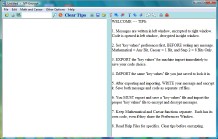
How It Works: Main Program Window
(JVP-Encrypt allows 88 characters from the keyboard)

1. Messages are written in left window, encrypted to right window. Code is opened in left window, decrypted in right window.
2. Set "key values" preferences first, BEFORE writing any message. Mathematical = Any Bit, Caesar = 1 Bit, and Step 2 = 8 Bits Only.
3. EXPORT the "key values" immediately to save your code choice.
4. IMPORT the same "key values" file you just saved to lock it in.
5. After exporting and importing, WRITE your message and encrypt it. Save both message and code as separate .rtf files.
6. You MUST export and save a "key values" file and import the proper "key values" file to encrypt and decrypt messages.
7. Keep Mathematical and Caesar functions separate. Each has its own code.
8. To give away hard copy code, export "key values" for Print.
9. Read Help Files for specifics. Clear tips before encrypting.

26 letters all upper case are not adequate in coding messages.
Even 52 letters, upper and lower case, are not enough for good code.
Using 88 characters from the keyboard is a much better way to code.
JVP-Encrypt gives you that extra advantage in coding with 88 characters.

You must have the Microsoft .NET Framework 2.0 installed on your computer.
If you do not have that installed, some features will not be available to you.
JVP-Encrypt has been tested on Windows Vista.


*******

How to Send and Receive Coded Messages by E-Mail | Back to the Top

It is strongly advised that all e-mail communications
be through ATTACHMENT files ONLY.
DO NOT PASTE e-mails into the program.

1. How to Send E-Mail Messages in Code
You can send e-mail messages easily with JVP-Encrypt.

Recommendation:
1. Encrypt your message using JVP-Encrypt.
2. Save the encryption file (.rtf) and the IMPORT file (.txt).
3. Open your e-mail program.
4. Attach your .rtf Coded Message file (the encryption).
5. Write in the body of the e-mail that your message is attached.

That is the best way, provided that your associate already has the IMPORT file. If the associate does not have the IMPORT file, simply attach that as well. Or, you can put the IMPORT file on CD and give the CD to your associate.

You have to give your IMPORT file to your associate only once to decrypt your messages. As long as you use the very same IMPORT file, you can send as many messages as you like to your associate under the same IMPORT file code.

If you change IMPORT files to a new code, you must give that new IMPORT file to your associate, or the associate cannot decrypt your new message.

2. How to Receive E-Mail Messages and Decode
If you receive an e-mail with a coded message attached, you need to know the IMPORT file that will decrypt it.

Therefore, you should keep a folder or a CD with the IMPORT files you have associated with your particular group of people.

Recommendation:
1. Open your e-mail. Download the attached .rtf file.
2. Open JVP-Encrypt.
3. Open the .rtf message you just downloaded.
4. Import the proper .txt IMPORT file for associate's message.
5. Decrypt the message under the proper Menu.

That's all there is to it. The e-mail process has been tested using AOL, Netscape and Yahoo e-mail and a Windows computer at home, with Internet Explorer, Safari, and Opera browsers.

Just remember, you must have the proper IMPORT file for the message.

You must also know what Menu the associate has used --- Mathematical, Caesar, Caesar Heavy, or perhaps Step 2 Algorithm, CodeCircle, MatrixBox or LetterPair.

*******

Some Simple Examples | Back to the Top

These are just a couple very basic examples of the program's output.
JVP-Encrypt can be operated in several ways, even using your own files.

The Step 2 Algorithm method is not shown below,
for numerous reasons related to security.
The Caesar Heavy Method is also not shown.
The CodeCircle program is a different device entirely,
as are the MatrixBox and LetterPair programs.

Reading the Free PDF Preview will help you understand the programs.

1. Mathematical Encryption (Using any character string),
from 88 character set:

(Can be used with any size integers, letters, or any characters)

605557387766648000404721776679485738633208440844
358800405189989415761576004031525738573864360040
625319515424004098947948004064364068573800406436
648057385738406819515424255757384261084408446904
19516264573848070844567777666480140077667948


TRANSLATION - Retaining Configuration:
Dear Jane:

I will meet you in the treehouse.

Love,
Tarzan


2. Caesar Encryption (Mono-alphabetic),
from 88 character set:

(Can be used with single integers, letters, or any single character)

Ghdu!Wdu5dq'bbL$oo!eh!zdlwlqj!iru!3rx@bbOryh"bMdqh

TRANSLATION - Retaining Configuration:
Dear Tarzan:

I'll be waiting for you.

Love,
Jane


Many more examples could be issued for you, but you get the point. JVP-Encrypt can be used in numerous ways to suit your own needs. You can run messages through more than once to double-code any message, or any number of other various maneuvers to try to ensure greater security in your messages.

*******

The history of using coded messages or ciphers is long and filled with many stories of how codes were broken. Many people will say there are no types of encryption which cannot be analyzed and decrypted by someone to whom the message was not sent.

This is, of course, a fallacy. There are certain modes of encryption that can be made unbreakable. The point to make is that the key or keys to solving the cipher must be kept secret.

Once this secrecy has been established through secure means, the issue becomes one of finding "white space" in the code, since any "white space" gives away the position of any word in the particular message.

After the "white space," where one can describe words and where they appear, the solution to the message most often relies on two main items: 1) Frequency of certain characters, and 2) Position of certain characters.

For example, if you isolate a 2-letter word, the word can be only one of the following combinations in a "normal" message: Am, An, As, At, Be, By, Do, Go, He, If, In, Is, It, Me, My, No, Of, On, Or, So, To, We.

I say "normal" messages, because you can make anything into a 2-letter word, if you have creative license. Also, some others don't happen too often.

Therefore, many times a message is encrypted more than once to ensure that some person cannot crack the entire code. If they crack the first level, they will still get unreadable sequences of letters, and the work continues to solve the puzzle through the next level of encryption.

JVP-Encrypt provides numerous methods of encryption and decryption, but one thing is for certain. Although the encryption process can be automated and singular, even if it encompasses more than one encryption, the decryption process should NEVER be automated. That is the last thing you'd want, since it would enable the unwanted person to use an automated device instead of manual labor to crack the code.

The decryption process, even if it is mechanical or computational, even if it is done by computer software, should always be "one step at a time." JVP-Encrypt does indeed decrypt for you as the software should, but if you use multiple methods of encryption, the decryption will have to be run multiple times as well.

*******


By purchasing and/or downloading JVP-Encrypt, you certify that
you have read and understand the PDF Preview and License, and that you
have Microsoft .NET Framework 2.0 installed on your computer.

*******

REQUIREMENTS:
You must have the Microsoft .NET Framework 2.0 installed on your computer.
The installation program will install ONLY on WINDOWS.

JVP-Encrypt was written using the SharpDevelop 2.1 IDE in C#.
You must have the Microsoft .NET Framework 2.0 to use the program.

If you do not have the Microsoft .NET Framework 2.0, you can get it here:

Microsoft Downloads


*******


Single User License | Back to the Top


JVP-Encrypt
Encryption and Decryption Software
by
Mr. J.V. Presogna
Presogna Productions

http://www.go2jvp.com/

Copyright © 2010
All Rights Reserved

SINGLE USER LICENSE ONLY


REQUIREMENTS:
You must have the "Microsoft .NET Framework 2.0" installed.

********************

JVP-Encrypt License:

********************

"JVP-Encrypt," hereinafter to be called the PROGRAM, is the work of Mr. J.V. Presogna, hereinafter to be called the AUTHOR.

This document, hereinafter to be called the LICENSE, gives "you" certain rights to use the PROGRAM. By downloading and using the PROGRAM, "you" agree to the terms of the LICENSE. "You" are referred to as the USER in this LICENSE. If "you" do not agree to the terms of this license, do not download the PROGRAM.

Statements:
1. All work in the PROGRAM is the creation of the AUTHOR, and is copyrighted.
2. The PROGRAM was written in C#, using the SharpDevelop IDE as the programming environment.
3. It can be run on any system which has the Microsoft .NET Framework 2.0 installed.
4. A similar version for other languages is not currently available.
5. All exclusive rights and ownership of the programs in the GUI remain with the AUTHOR.
6. The sole owner of the PROGRAM is the AUTHOR.

The USER: Rights and Restrictions.
1. The USER must be an individual person, and cannot be a company or group.
2. The USER cannot copy, disassemble, decompile, distribute, modify, rent, or sell the PROGRAM.
3. The USER cannot make available for money, or for free, any portions of the PROGRAM, in whole or in part.
4. The USER cannot remove the name of the AUTHOR or the contact information from the PROGRAM.
5. The USER may use the PROGRAM for any personal or commercial use, provided the name "JVP-Encrypt" is included in the process.
6. In other words, the USER can use the PROGRAM to provide information with the PROGRAM, but the USER cannot modify or sell the actual PROGRAM itself.
7. The USER gains no rights to use the PROGRAM until the purchase price has been paid in full to the AUTHOR.
8. Commercial use is defined for the single individual using the program for his or her own endeavor, not as some web site component, which would be disallowed.

The AUTHOR:
1. The AUTHOR offers only the guarantee that the program is genuine.
2. The AUTHOR provides this PROGRAM for both personal and commercial use for the USER, after the purchase price has been paid, but the AUTHOR will not support any illegal activity.

Liability:
1. The AUTHOR will not accept any liability in any form in any situation concerning the USER and his or her use of the PROGRAM.

Warranty:
1. The AUTHOR cannot give warranty past the point of stating the PROGRAM is genuine.

Back to the Top

*******


Art | Freeware | go2jvp Main | Music | Science | Sports | Writing

www.go2jvp.com